


Last updated: November 4, 2026
Microsoft 365 Archive and ShArc by Layer2 both reduce SharePoint Online storage costs by moving inactive files to cheaper storage. Microsoft 365 Archive now archives whole sites and individual files. An automatic inactive files policy is planned for December 2026.
So the question is no longer whether you can archive a file. It is what happens next: how fast users get it back, whether it can return to the archive, how precisely you control what gets archived, and what happens to version history. This article compares both tools, and covers costs, setup and compliance.
Would you prefer to test ShArc directly in your tenant? See one-click restore, preview and policy simulation in action. Book a demo and compare it live.
Complexity, setup, and user experience
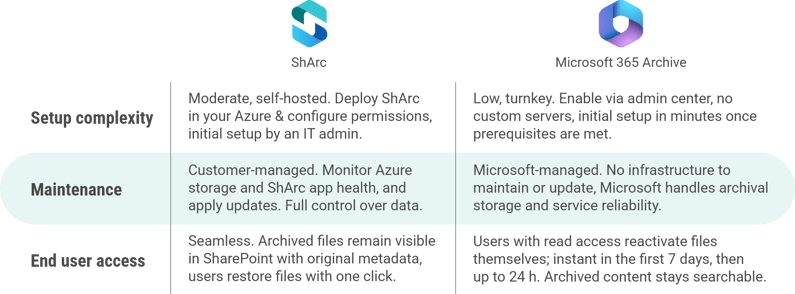
Deploying and managing ShArc vs. using Microsoft 365 Archive requires different levels of effort. ShArc is a customer-hosted solution, which means more control and customization but also more setup and maintenance on your end. M365 Archive is a turnkey cloud service, enabled with a few clicks, but less flexible in operation. The user experience also differs significantly: ShArc aims to be seamless for end-users, whereas with Microsoft 365 Archive, users have to reactivate an archived file before they can open it, which can take up to 24 hours after the first 7 days.
Setup process (initial deployment)
Setting up ShArc involves deploying the application in your Azure tenant. Layer2 provides tools and guidance to install ShArc’s components. You’ll need to create an Azure Storage account for the archived data and an Azure App Service to run the ShArc service. Then you connect ShArc to your SharePoint Online via an admin consent (granting it permissions via Microsoft Graph). This setup is a one-time effort and typically accomplished by an IT administrator with Azure and M365 admin skills. You can also roll out ShArc step by step: the ShArc app can be activated on selected sites only, for example for a proof of concept.
By contrast, Microsoft 365 Archive has a very straightforward enablement: an admin with the appropriate roles needs to enable Archive in the Microsoft 365 admin center, which entails linking an Azure subscription for pay-as-you-go billing. No new servers or installations are required. It’s an on-demand service provided by Microsoft. Once enabled, admins archive whole sites in the SharePoint admin center or with PowerShell, and users with edit permissions can archive individual files. An automatic inactive files policy is in preview and planned to be generally available in December 2026. In summary, ShArc’s setup is more complex and hands-on you set up software in Azure, whereas M365 Archive’s setup is built-in and mostly configuration, no custom software to deploy.
Maintenance and updates
With ShArc, because it runs in your environment, ongoing maintenance is your responsibility. You need to monitor the Azure resources (ensure the ShArc service is running and scaled appropriately, and that your storage account has capacity, etc.). Layer2 regularly releases updates to ShArc, adding features and fixes, so you’ll want to apply those updates in your Azure environment to keep the system secure and efficient. Think of ShArc as another application you manage, albeit one that is cloud-based. The flip side is you have full control: you decide Azure region, performance tier, and you can integrate ShArc’s monitoring into your IT ops, for example, using Azure Monitor, ShArc can emit logs or alerts about archiving jobs.
Microsoft 365 Archive has virtually no maintenance overhead for the customer. Microsoft manages the underlying storage, durability, and updates to the Archive feature. Admins will still need to do “policy maintenance” deciding which sites to archive or when to run archives, but there’s no infrastructure to patch or log into. The relevant admin tasks are part of your normal SharePoint administration.
In short, ShArc gives you more administrative work and flexibility, whereas M365 Archive is a “set it and monitor it” service with low administrative effort.
End-user experience
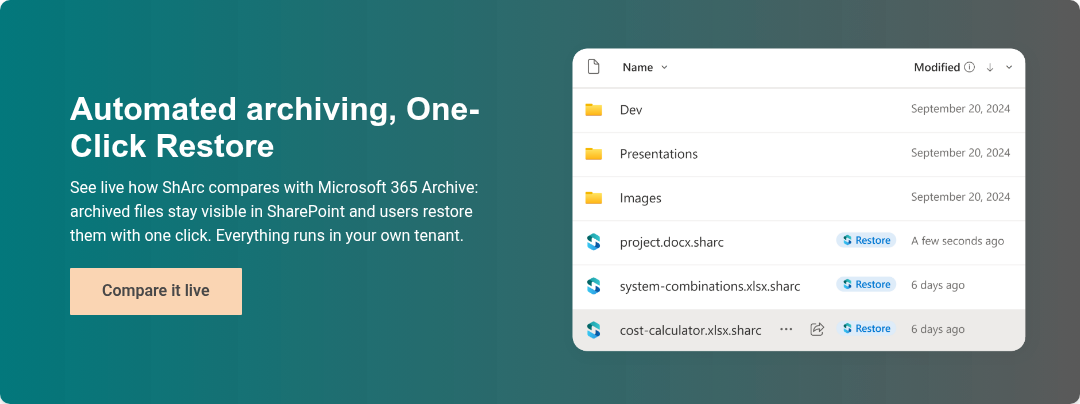
This is one of the major differences. With ShArc, end-users continue to work in SharePoint, Teams, or OneDrive exactly as usual. A file that has been archived by ShArc still appears in its original document library with the same name, metadata, and permissions. The only difference is an icon or notation indicating it’s archived. For example, ShArc uses stub .sharc files that show a ShArc icon instead of a pdf or word icon. If a user clicks an archived file, ShArc will transparently restore the file from Azure back into SharePoint, and then the file opens normally. This on-demand retrieval might introduce a short delay. Because of this design, users do not need training or new tools to retrieve archived content – it’s one-click within the familiar interface.
In contrast, content archived with Microsoft 365 Archive is no longer directly accessible until it is reactivated. For individual files, users with read access can reactivate a file themselves in SharePoint on the web. This is instant in the first 7 days after archiving, and can take up to 24 hours after that. Archived sites are no longer accessible to users until an admin reactivates the whole site. Archived content can still be found in search, but users have to wait for reactivation before they can open it. This makes Microsoft's approach a good fit for content that rarely needs to be opened again.
Archiving options and retrieval capabilities
Beyond cost and setup, it’s crucial to compare what each solution actually does with your data, how they archive it, retain it, and allow it to be retrieved. ShArc and Microsoft 365 Archive take very different approaches in granularity of archiving and retrieval mechanisms.
Granularity of archiving
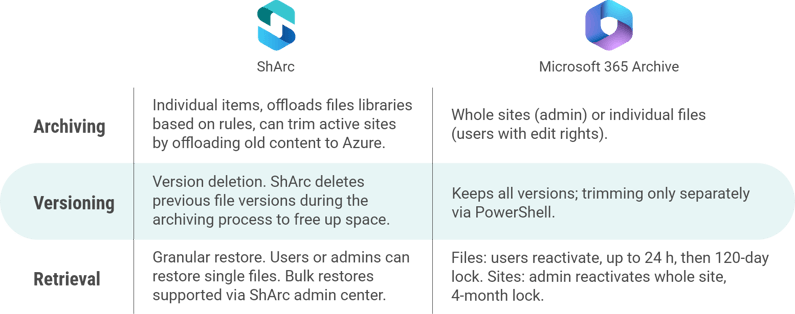
ShArc offers fine-grained, file-level archiving. It works within SharePoint sites by identifying items, like documents, that meet your criteria and archiving them individually. For example, you can set ShArc to archive any file in a site that hasn’t been modified in over 1 year, or archive files larger than 100 MB, etc. These rules can be scoped to specific libraries, sites or apply tenant-wide. Also, specific sites can be completely excluded from ShArc, e.g. for compliance reasons. The key is that active sites remain active, only the content is archived. This allows a “living” archive model: a SharePoint site can continuously archive older content via ShArc while new content is added, keeping the site’s size in check without shutting it down for user's access.
Microsoft 365 Archive originally worked only at site level: you archive an entire site, and all of its content (libraries, files, lists, permissions, metadata) moves to the archive tier together. Since July 2026, file-level archiving is generally available for SharePoint sites, so users with edit rights can also archive individual files. File-level archiving is not available for OneDrive. Unlicensed OneDrive accounts are archived automatically after 93 days. Read more in Microsoft Archive version trimming and file level archiving.
Version handling
Many versions of documents are a main cause of large storage consumption. ShArc offers the feature Version Retention and Cleanup. This allows you to automatically delete unnecessary versions during archiving—based on your rules, of course. Deleting versions frees up a lot of additional storage without costs.
With Microsoft 365 Archive, archived files keep all their versions, and versions can’t be archived separately. Version limits and trimming are separate admin settings, and existing versions are trimmed with PowerShell.
Retrieval of archived data
ShArc allows granular, on-demand retrieval of individual items. If a user or admin needs a specific file that was archived, they can trigger its restoration without bringing back everything else. Users simply click the file in SharePoint and ShArc will retrieve it behind the scenes. Alternatively, an admin can use ShArc’s interface to bulk restore a set of files or even a whole library or site if needed. Because ShArc doesn’t charge for restore operations and the stubs remain in place, it’s feasible to restore and re-archive content as needed with minimal friction and negligible Azure data transfer costs. After a file is restored, it lives in SharePoint again and could be archived again later by rule.
With Microsoft 365 Archive, retrieval depends on what was archived. Individual files can be reactivated by any user with read access, directly in SharePoint on the web. This is instant in the first 7 days after archiving and can take up to 24 hours after that. A reactivated file can’t be archived again, manually or by policy, for 120 days. Archived sites are reactivated as a whole by an admin in the SharePoint admin center or with PowerShell. Once reactivated, the site and its files reappear as they were, with permissions and versions intact, and the site can’t be archived again for four months. Microsoft’s approach is therefore designed for content that is rarely needed again.
Microsoft 365 Archive cost comparison
ShArc and Microsoft 365 Archive have different cost models. ShArc is sold as a subscription license per TB of archived data, plus the customer pays for Azure storage and any needed Azure infrastructure. Microsoft 365 Archive is a pay-as-you-go service with costs based on the amount of data archived. Both solutions can significantly reduce costs compared to buying additional SharePoint storage directly.
ShArc pricing
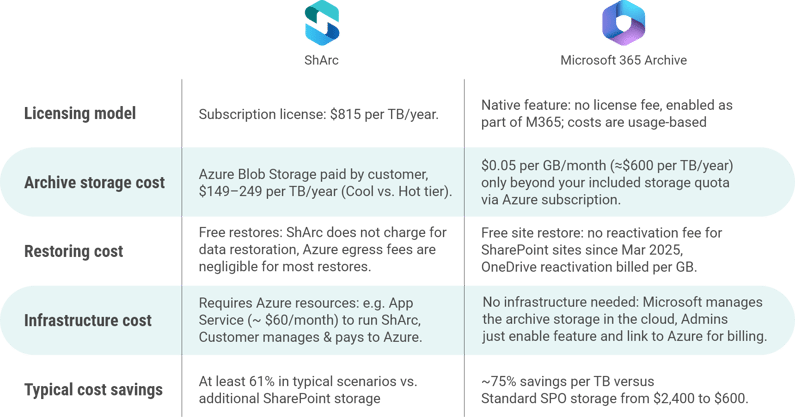
Licenses are purchased in 1 TB increments at $815 per TB per year. This is a flat annual fee for the software. There are no user licenses or hidden fees. Pricing is purely based on the maximum archived volume. Importantly, ShArc does not charge anything to restore data back into SharePoint, bringing files back is free from the ShArc licensing perspective, and end-users restore data using the One-Click Restore.
In addition to the ShArc subscription, the organization pays for the Azure Blob Storage where the archived files reside and the App Service Plan to host the ShArc service. Even with these, ShArc’s costs come out at least 61% lower in typical scenarios than the equivalent cost of purchasing the same amount of additional SharePoint storage from Microsoft (Office 365 Extra File Storage add-on).
Microsoft 365 Archive Pricing
Microsoft charges $0.05 per GB per month for archived data. That equates to $50 per TB per month, or about $600 per TB per year, roughly one-quarter of the cost of standard SharePoint Online storage which is $0.20/GB-month, or $2,400/TB-year. Archive storage is metered and billed through pay-as-you-go billing, which must be set up before you can use Microsoft 365 Archive. You aren’t charged for archive storage as long as your combined standard and archive storage stays within your tenant’s standard storage quota, as you can read in Microsoft Learn: Microsoft 365 Archive FAQ. Archiving individual files doesn’t reduce a site’s reported storage or quota. At tenant level, the data is only reclassified from active to archived storage.
There is no separate license and no infrastructure fee, since it’s a service managed by Microsoft. Reactivating archived SharePoint content has been free since March 31, 2025. In summary, Microsoft 365 Archive follows a pure consumption model: pay $600 per TB per year for stored data (when applicable). This predictable low unit cost can yield ~75% savings relative to buying equivalent SharePoint space, making it very attractive for large volumes of inactive site collections. If you need more information about Microsoft 365 archiving pricing, see our breakdown with scenarios and calculations.
Key decision factors
When deciding between ShArc by Layer2 leading solutions and Microsoft 365 Archive, consider the following key factors and requirements in your scenario. These factors can tilt the decision toward one solution or the other.
Granularity of archiving needs
Do you need to archive individual files or subsets of content while keeping the rest of a site active? Both tools can archive individual files. The difference is control: with ShArc, admins archive files centrally by rules such as file age, size, type, site, library or folder. With Microsoft 365 Archive, users archive files manually, and an automatic policy based on last access is in preview. If you mainly archive whole sites that are no longer needed, Microsoft 365 Archive may be enough.
End-user access requirements
How important is it that end-users can still see or retrieve archived content? With ShArc, archived files stay visible and users restore them in one click within seconds. With Microsoft 365 Archive, users with read access can reactivate archived files themselves, but after the first 7 days this can take up to 24 hours, and archived sites have to be reactivated by an admin. If fast user access is important, ShArc has an advantage.
Compliance and retention policies
Are you in a heavily regulated environment with strict retention/audit needs for the data you want to archive? Microsoft 365 Archive keeps archived data fully under Purview compliance (automatic), whereas with ShArc you’ll need to manage compliance for archived blobs manually (and perhaps avoid archiving certain data). If seamless compliance is a must-have, Microsoft’s approach reduces risk.
Cost structure preference
Would you rather pay a known fixed cost annually for a solution, or pay purely per usage? ShArc’s subscription is a fixed yearly cost per TB (good for predictable budgeting). Microsoft’s Archive is variable, scaling exactly with how much data you archive and for how long. Depending on your budgeting approach (CapEx vs OpEx), one model may be more appealing.
Frequency of data retrieval
Do you anticipate needing to frequently restore or access pieces of archived data? If archived files will be tapped often (even if just one file at a time), ShArc provides a much more efficient workflow and no added cost for those retrievals. If archives are truly “write once, read almost never” for you, Microsoft 365 Archive might be fine.
Strategic alignment
Consider your organization’s stance on using 3rd-party tools vs. Microsoft-native solutions. Some prefer to leverage Microsoft’s built-in capabilities whenever possible (for support, integration, and future roadmap reasons). Others don’t mind a specialized third-party tool if it delivers better results. If you value having direct Microsoft support and a feature that will evolve within the M365 roadmap, M365 Archive is the choice. If you value the niche expertise and flexibility that Layer2 provides (and perhaps faster feature development in that niche), ShArc is attractive.
Conclusion
Both ShArc and Microsoft 365 Archive can effectively reduce SharePoint storage costs, but they serve different use cases. ShArc is ideal for a “dynamic archive” that keeps users in the loop and tidies up active sites continuously. Microsoft 365 Archive is ideal for a “cold archive” of completed data sets, maximally integrated with compliance, but archived content has to be reactivated before users can open it. In many cases, organizations might use a combination: for example, use ShArc to keep active collaboration sites lean, and use Microsoft Archive for whole sites that have concluded. The decision matrix above should help clarify which solution aligns better with your organization’s priorities and constraints.
Interested in more information? Learn how Microsoft 365 Archive works, what it costs and its limits.
