

Discover your savings potential with the Cost Calculator or a call with an expert
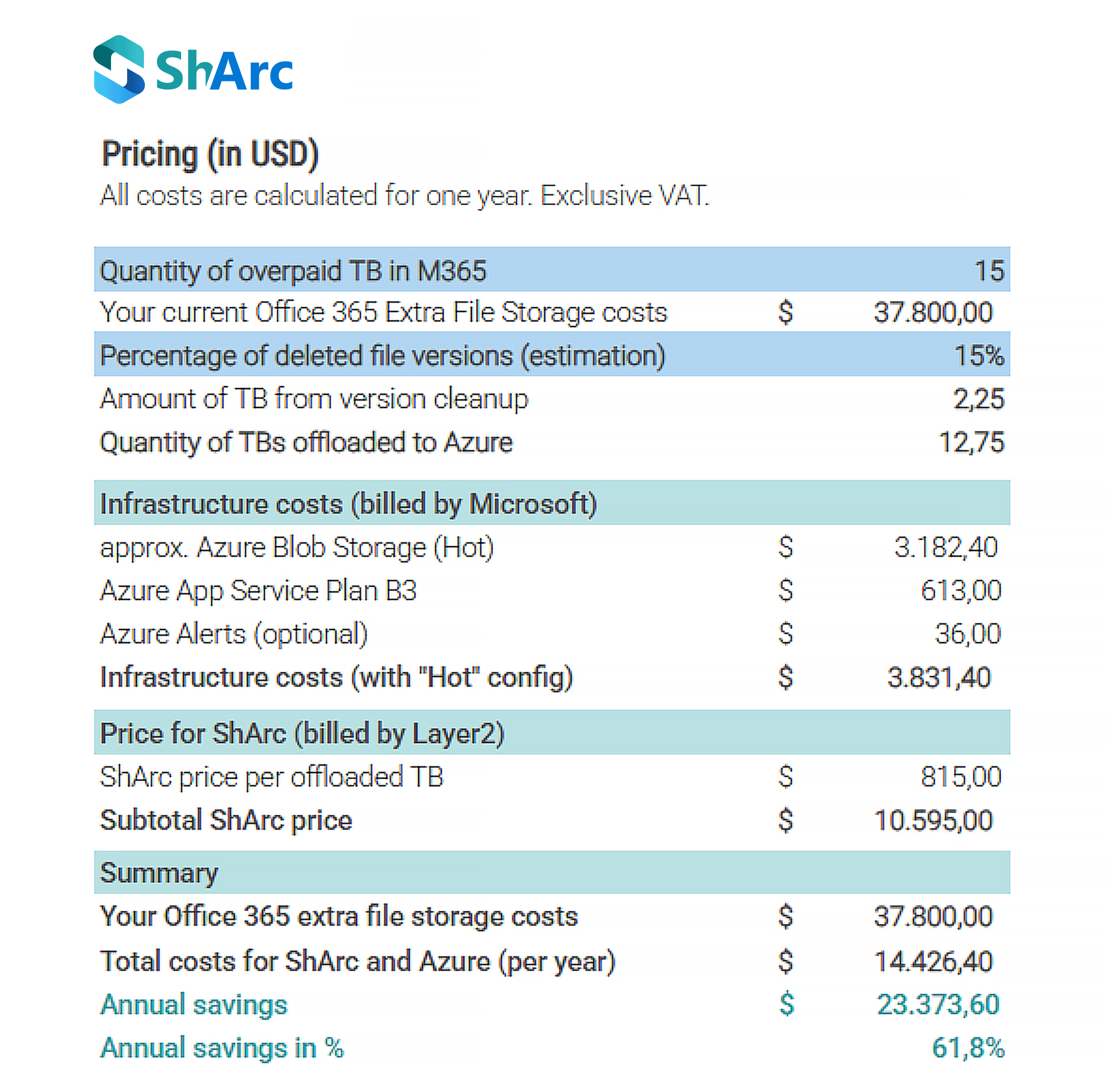
The calculation example shows what ShArc customers typically save: SharePoint storage costs are reduced by at least 61%, without taking files away from users. Files stay visible in SharePoint, Teams, and OneDrive, and users restore them with one click.
The Cost Calculator provides a clear, side-by-side comparison: what you pay for extra SharePoint storage today versus the cost with ShArc. Build a transparent, numbers-based business case for your team.
Get your own SharePoint Cost Calculator and see how much you can save in your own SharePoint environment. Or talk to one of our experts about your savings.
Find out what your SharePoint storage bill should actually look like
Most admins don't see the full cost of extra Microsoft 365 storage until it shows up on the invoice. The SharePoint Cost Calculator gives you the exact numbers upfront: what you're paying now, what you'd pay with ShArc, and how fast the difference adds up.
Why request the SharePoint Cost Calculator?
Because guessing is how storage costs get out of hand. This tool gives you a line-by-line breakdown you can actually bring to a budget conversation.
What the Calculator shows
- Your storage cost with ShArc
Enter the amount of data you want to archive and instantly see your projected Azure storage costs, plus ShArc licensing per TB. - A direct comparison to Microsoft’s pricing
Exact Azure infrastructure costs and ShArc licensing per TB, no hidden items. - Your real annual savings
The Calculator highlights your ROI in both currency and percentage.
How it works
- Enter your data volume in TB: enter the number of terabytes you want to archive to Azure.
- See your real costs: estimated Azure infrastructure costs, ShArc license costs per TB and your total annual cost.
- Compare with Microsoft’s pricing: benchmark these numbers against the costs of additional SharePoint storage.
- Understand your ROI: your total annual savings and how quickly ShArc pays for itself.