


For many organizations, Microsoft 365 SharePoint has become the central hub for storing and collaborating on documents. However, as projects expand and data accumulates, storage demands quickly rise. Companies often find themselves paying significant sums each year for additional SharePoint storage, especially as unstructured files, multiple versions, and duplicates inflate volumes. Old or inactive files typically remain untouched due to lacking "data hygiene," further compounding the problem.
This creates a situation where businesses regularly face the dilemma of topping up storage at high costs or exploring alternative solutions. Offloading data, moving less frequently accessed files to more cost-efficient cloud storage like Azure Blob, emerges as a sustainable and cost-effective option. With an Return on Investment analysis, businesses can understand how much they currently pay for SharePoint storage and how much they could save through offloading.
Cost dilemma: buying vs offloading
Let’s consider the example of a mid-sized company with 1,000 employees using Microsoft 365 E3 licenses. Their default SharePoint storage allocation is already fully consumed, and they require an additional 5 TB annually.

Option a: buying more SharePoint storage
Purchasing extra SharePoint storage costs on average €11,000–12,000 per year for 5 TB. Since this has no effect on data growth, additional purchases are likely required in the future as storage needs continue to expand.
Option b: offloading to Azure Blob Storage
Instead of continuously buying premium SharePoint storage, organizations can offload files to Azure Blob storage:
• 5 TB of Azure Hot Storage: ~ €1,100 per year
• Offloading tool license: ~ €3,500–4,000 per year (depending on vendor and discounts)
• Optional Azure server/app service: ~ €600 per year
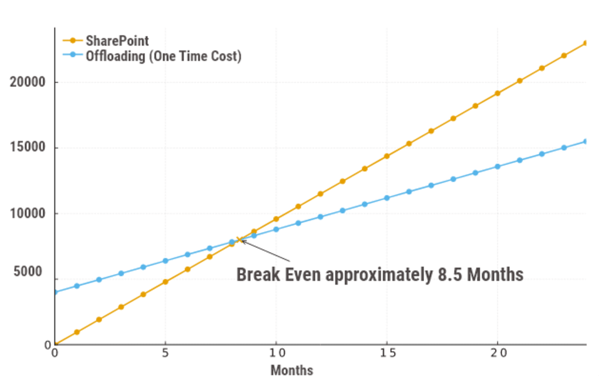
This totals €5,500–6,000 annually — a reduction of roughly 50% compared to direct SharePoint storage purchases. Even at this modest scale, offloading proves financially compelling.
ROI analysis: direct and indirect savings
Beyond the direct cost reductions, offloading delivers several indirect benefits that contribute to faster ROI:
• Lower administrative effort: With fewer active system files in SharePoint, backup processes become faster and simpler, and IT teams receive fewer storage-related support tickets.
• Better performance: By retaining only relevant files in premium SharePoint storage, users experience improved search and load times. Productivity rises because employees spend less time waiting for systems to respond.
• Faster ROI: Many organizations achieve break-even on their offloading investment within 6–12 months, thanks to both direct and indirect savings.
When these operational benefits are included in the ROI analysis, the financial case for offloading becomes even stronger.
Why offloading is worth it
From a technical perspective, offloading improves data hygiene. Companies can remove stale and duplicate content from high-cost storage while ensuring access to files when needed. The user experience remains seamless, as modern offloading tools integrate directly into existing workflows. Employees typically don’t even notice that files are stored in different tiers of cloud storage.
From a financial perspective, even a few terabytes of offloaded data can deliver significant savings. As data volumes grow, the benefits compound: the bigger the data footprint, the faster the investment pays for itself.
Additionally, offloading can prepare organizations for the future. Reduced storage volumes mean shorter backup times, easier migrations, and less risk of performance bottlenecks. In other words, the strategy not only addresses today’s cost challenges but also positions companies to handle future data growth sustainably.
A proven strategy for sustainable storage management
In summary, SharePoint offloading represents a practical, proven strategy to keep storage costs under control while improving system performance and efficiency. Direct cost savings of up to 50% are already compelling. When indirect benefits like reduced admin workload, faster backups, and improved user performance are factored in, the ROI analysis becomes even more attractive.
For organizations struggling with ever-growing data volumes, offloading is not just a financial decision. It’s a long-term strategy for sustainable and efficient storage management.

Frequently asked questions about return on investment, offloading vs SharePoint
Here we'll answer some frequently asked questions about offloading.
What does “offloading” mean in the context of SharePoint?
Offloading in the context of SharePoint refers to moving rarely used or inactive files from SharePoint’s expensive primary storage to more affordable cloud storage, such as Azure Blob. This reduces costs while keeping data accessible and compliant.
How does offloading compare financially to buying more storage?
Offloading to Azure Blob can cut storage cotst by more than 50%. For example, instead of paying €11,000–12,000 annually for 5 TB of SharePoint space, offloading the same data costs roughly €5,500–6,000, including Azure storage and licensing.
Does offloading affect end users?
Offloading affects end users when you don't give them familiar access to data. But modern offloading tools integrate directly with SharePoint and Teams, so users still see and open their files as usual, even if they’re stored in different Azure tiers. The entire process happens automatically in the background.
How scalable is offloading for growing enterprises?
Offloading is scalable for growing enterprises. The larger the data footprint, the greater the savings. Offloading scales easily with business growth, enabling organizations to manage storage expansion sustainably while avoiding performance bottlenecks or future migration challenges.
Is offloading only about saving money?
Offloading is not just about saving money. While financial savings are substantial, offloading is also about efficiency and long-term strategy. It optimizes system performance, simplifies administration, and prepares organizations for future cloud growth and data governance initiatives.