Last updated: October 6, 2026
When Microsoft 365 rolled out its generous-looking storage packages for SharePoint and OneDrive, most IT leaders breathed a sigh of relief. But today, those same admins are watching their costs skyrocket, performance dip, and compliance concerns mount. What’s happening? You can download the complete SharePoint Storage Guide here.
This article exposes the hidden traps in Microsoft’s storage model. Why larger tenants get penalized, how collaboration habits bloat your quotas, and what steps you can take to regain control before your budget implodes. Spoiler alert: it’s not about deleting data. It’s about getting smart with it.
The storage trap: why Microsoft’s model doesn't scale
Microsoft’s storage allocation seems simple at first glance: each tenant gets a flat 1 TB, plus 10 GB for every licensed user. For small companies, that often works fine. For example, 50 users get a respectable 2.5 TB, about 30 GB per user. But as user count grows, the benefit per user shrinks fast.
An enterprise with 800 users? Just 9 TB total. That’s only 11.25 GB per user, less than half of what a 50-person shop gets.
OneDrive does offer each user 1 TB of personal storage, but this can’t be used for shared content like team sites or departmental folders. It’s isolated, unshareable, and technically siloed, even though it's SharePoint under the hood.
At the surface level, it looks like there’s plenty of storage. But in practice, IT departments quickly hit the wall and the culprits are hiding in plain sight.
The silent killers: versioning, ROT, and cloud ignorance
Let’s assume your organization has 2,250 Microsoft 365 E3 licenses. Your total storage quota would be:
1 TB (base storage) + (2,250 x 10 GB) = 1 TB + 22.5 TB = 23.5 TB
This means your Microsoft 365 storage quota would allow you 23.5 TB across SharePoint Online, which also includes Teams file storage. A good rule of thumb: every 100 licenses provide an additional 1 TB of storage. You might have read some articles saying only "assigned licenses to active users" would count for the storage quota. But that is not right. An active license in the M365 tenant is sufficient.
Important to know, not all licences have the +10 GB benefit. Plans not including SharePoint (e.g. Visio) or F1 licenses do not add extra storage. Basically, all Microsoft 365 suites (M365 Business Basic, Standard and Premium, Office 365 E1/E3/E5, M365 E3/E5) and SharePoint Online plan 1 & 2 and Teams grant 10 GB per license. For more information, please read:
1. Versioning mayhem
Every time someone edits a file in SharePoint or Teams, a new version is stored. Microsoft supports up to 500 versions per file. While this helps with collaboration and recovery, it silently eats your quota. Admins report that version histories can consume 30% or more of active project storage. End users love it; your storage bill doesn’t.
2. “Lift and Shift” gone wrong
Too many migrations happen without proper data cleanup. Legacy folders, outdated file dumps, and inactive projects all get pushed to the cloud. Gartner and NetApp estimate that 60% to 80% of cloud data hasn't been accessed in over a year. Instead of streamlining, most companies replicate their mess.
3. ROT data and chaos
Redundant, obsolete, and trivial (ROT) data often makes up over 30% of stored files. Yet fewer than 20% of companies have classification strategies in place. With 80% of enterprise data being unstructured, and growing at 25% to 30% per year, it’s only a matter of time before your “cloud” turns into a digital landfill. See what all this unused data really costs you.
Data duplication is another hidden burden. Attachments flying around via email, copied folders in different teams, backup folders made "just in case". These all lead to bloated storage. It’s estimated that 20% to 30% of enterprise files are duplicates.
5. Undefined responsibilities
Nobody wants to be the cleanup crew. When there's no clear governance, files pile up. Add in forgotten recycle bins (yes, deleted SharePoint files still count against your quota), and you’ve got a ticking time bomb. According to IDC, 70% of stored files are inactive just 90 days after creation.
6. No awareness of cost triggers
Here’s the kicker: storage in Microsoft 365 is deceptively expensive. Many companies only realize too late that costs have climbed over 40% annually, especially once they cross the default quota and hit pay-as-you-go pricing. And there’s no easy dashboard showing where these costs come from, leaving IT teams flying blind.
The real cost of doing nothing
Besides the budget drain, letting storage spiral out of control creates other risks:
- Performance drops: Microsoft doesn’t officially document it, but many admins report slow page loads, OneDrive sync issues, and even SharePoint sites getting locked into read-only mode.
- Compliance headaches: The more unstructured your data, the harder it is to audit, tag, and secure.
- Shadow IT: Frustrated departments start storing data in Dropbox, Google Drive, or rogue USB drives.
- Overworked IT staff: Constantly upgrading storage, fielding restore requests, and trying to keep performance acceptable eats into time better spent elsewhere.
We've more information for you regarding SharePoint costs. See what SharePoint extra storage costs, or get a detailed cost breakdown per GB or TB.
There’s a smarter way: smart storage archiving
Instead of fighting data growth with more storage purchases, leading IT teams are turning to automated archiving solutions. One such tool is ShArc, which bridges SharePoint and low-cost Azure Blob Storage without breaking the user experience.
How archiving data works
- Rule-based archiving: Admins define when and what to archive, by file size, last access date, site, or metadata.
- Stub files replace originals: A lightweight .sharc file sits in SharePoint, linking users to the archived file. No broken links, no missing context.
- Instant access: When users click the file, it loads from Azure. They don’t even need IT support.
- Endless capacity, reduced costs: Storing 100 TB? That’s $192,000 per year on SharePoint Online vs. as low as $1,188 on Azure Blob Storage.
Case study: $3,000 saved per month
A mid-sized company implemented ShArc and archived over 50% of its stale SharePoint data to Azure Blob Storage. Employees continued working in SharePoint and Teams with no disruptions. The result? $3,000 saved per month and better visibility into their storage landscape. Read how our customers saved 61% and more in our case studies.
Smart archiving versus classic archiving
Compared to traditional archiving solutions, the smart archiving approach, such as the one enabled by ShArc, offers clear advantages in terms of efficiency, user experience, and compliance. While classic archiving typically relies on separate, complex archive systems, smart archiving is fully integrated into SharePoint. Archiving processes are automated and rule-based, eliminating the need for manual user actions. In terms of compliance and governance, smart archiving operates within the existing Microsoft 365 security and authorization framework, avoiding the fragmented control often seen in external archives. Recovery is also drastically simplified: instead of time-consuming IT-driven restore procedures, users can retrieve files with a single click directly in SharePoint, files are automatically reloaded and instantly accessible.
How much could you save?
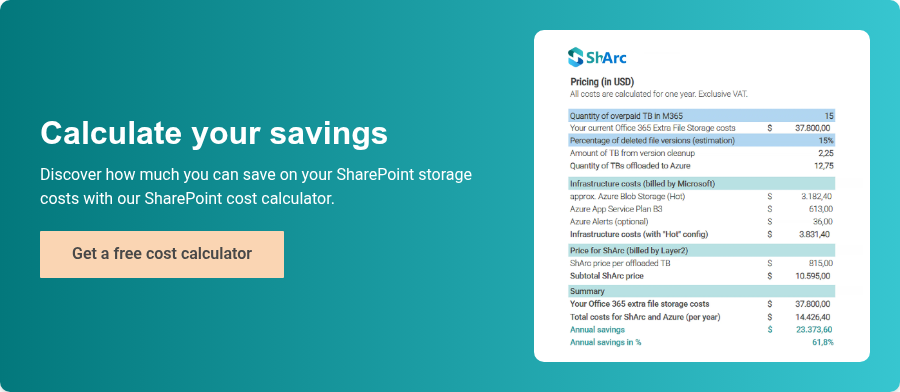
The SharePoint Cost Calculator answers this question for you. With this free tool, you can easily calculate how much you’ll save by using ShArc.