

Last updated: July 23, 2026
Many SharePoint environments contain hundreds or thousands of sites. In these cases, it is usually not practical to create one ShArc policy per site.
However, policy planning should not start with the number of sites alone. It should start with the SharePoint storage level you want to reach and maintain.
For example, assume your tenant currently uses 80 TB of SharePoint storage. Your included SharePoint storage capacity is 30 TB, so you are currently paying for 50 TB of additional SharePoint storage.
In this case, the first goal is to archive approximately 50 TB of cold data to remove the need for paid additional storage. However, we also recommend keeping a growth buffer within your included SharePoint storage capacity. If your included capacity is 30 TB and you want to keep 10% free, you should reserve 3 TB as buffer. This means your target SharePoint usage is not 30 TB, but approximately 27 TB.
In this example, the initial archive target would be approximately 53 TB:
80 TB current SharePoint usage – 27 TB target SharePoint usage = 53 TB archive target.
After the initial rollout, the goal is to keep this buffer over time. If your SharePoint storage grows by, for example, 1 TB per month, your recurring policies should aim to archive at least that amount of newly cold data over time, so the tenant remains close to the target level of 27 TB used and 3 TB free.
For example, if your tenant contains 8,000 SharePoint sites, you should not create 8,000 individual policies. Instead, we recommend grouping sites by archiving logic, expected archive volume, business relevance, and operational risk.
This article explains how to define an archive target, structure ShArc policies for large SharePoint tenants, and plan a controlled rollout.
Recommended approach at a glance
Before creating policies, define the SharePoint storage level you want to reach and maintain. This includes calculating how much data must be archived to remove paid additional storage, keeping a buffer within your included SharePoint storage capacity, and considering expected monthly SharePoint growth if this information is available.
After that, the recommended operating model is:
- Export your SharePoint site inventory.
- Prepare a rollout matrix.
- Group sites by archiving logic, business area, and risk.
- Use ShArc Estimation for selected individual URLs.
- Add estimation results to the rollout matrix.
- Calculate how each policy batch contributes to the archive target.
- Use Simulation selectively for validation.
- Start with a controlled first rollout batch.
- Validate the results.
- Continue with the next batch until the target storage level is reached.
- Maintain the buffer over time with recurring policies.
You should avoid starting all sites at once. A controlled rollout helps reduce operational risk, keeps SharePoint load manageable, and gives your IT team time to validate the results before scaling further.
Before you start: Define your storage target
Before creating policies, define the SharePoint storage level you want to reach and maintain.
For example, assume your tenant currently uses 80 TB of SharePoint storage. Your included SharePoint storage capacity is 30 TB, so you are currently paying for 50 TB of additional SharePoint storage.
The first goal is to archive approximately 50 TB of cold data to remove the need for paid additional storage. However, stopping at exactly 30 TB would leave no room for future SharePoint growth. Therefore, we recommend keeping a buffer within the included SharePoint storage capacity.
If your included capacity is 30 TB and you want to keep 10% free, you should reserve 3 TB as buffer. This means your target SharePoint usage is approximately 27 TB.
In this example, the initial archive target is:
80 TB current SharePoint usage – 27 TB target SharePoint usage = 53 TB archive target.
This gives you two targets:
- Archive approximately 50 TB to remove the need for paid additional storage.
- Archive an additional 3 TB to keep 10% of the included capacity free.
If you know your average monthly SharePoint growth, include it in your operating model. For example, if SharePoint grows by approximately 1 TB per month, your recurring policies should aim to archive at least 1 TB of newly cold data over time. This helps maintain the buffer instead of only reaching it once.
Once this target is clear, you can use the rollout process below to identify which sites and policies should contribute to that target.
Step 1: Export your SharePoint site inventory
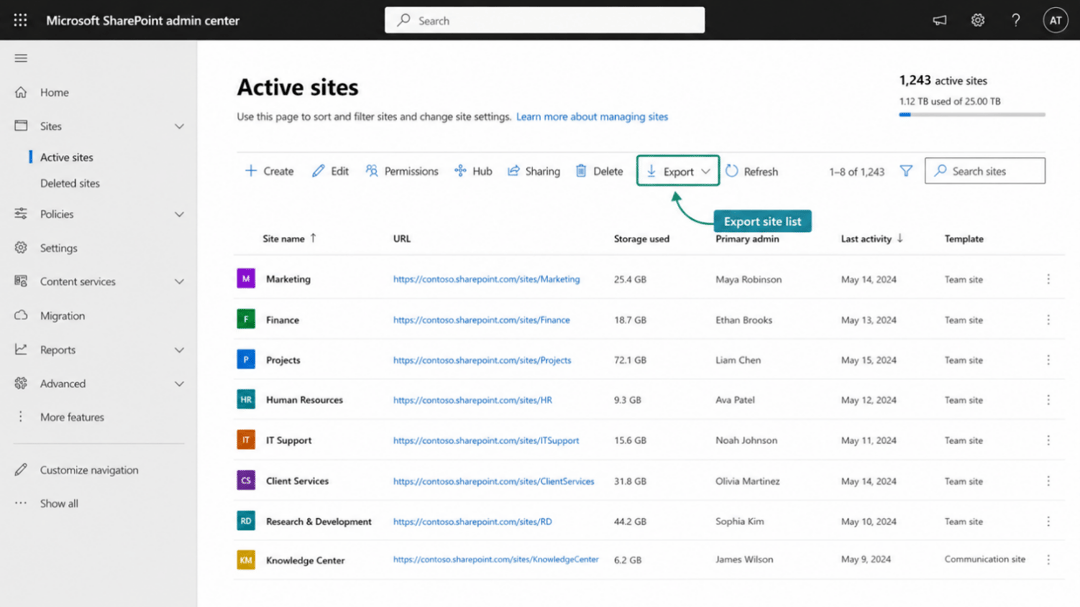
Before creating policies in ShArc, start with a site inventory export from the SharePoint Admin Center.
The export should include:
- Site URL
- Storage used
- Optional: Site owner
- Optional: Department or business unit, if available
- Optional: Site type or template, if available
- Optional: Last activity, if available
- Optional: Sensitivity or compliance information, if available
This export becomes the basis for your rollout planning. It helps you identify the largest sites, sensitive areas, and sites that can follow the same archiving rule.
Step 2: Prepare a rollout matrix
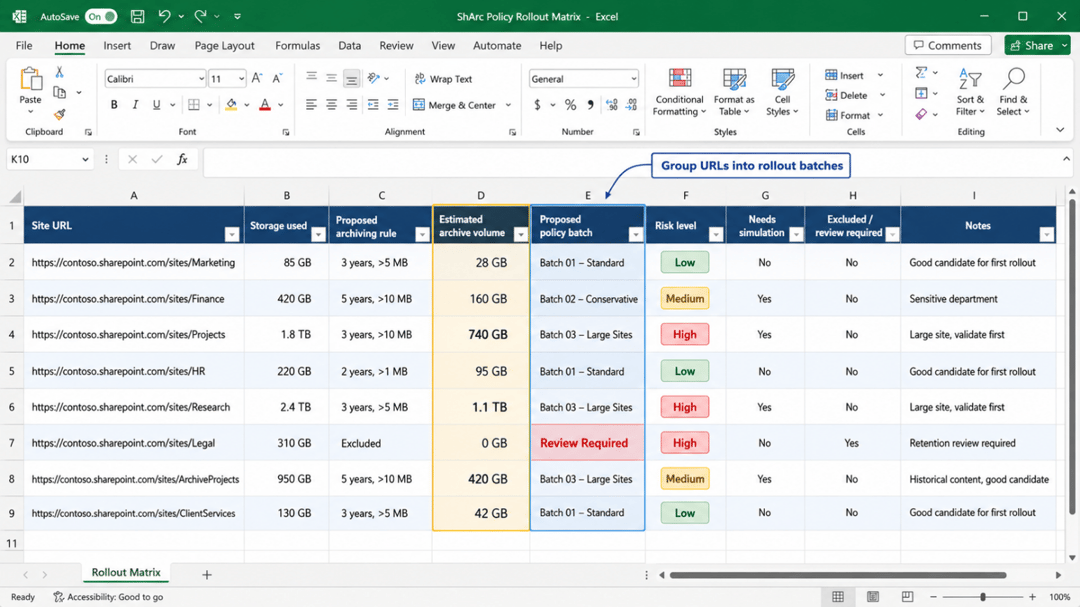
After exporting the site list, prepare a rollout matrix. This can be done in Excel or another planning tool.
The rollout matrix helps you decide which sites should be grouped together and which sites should be treated separately.
Recommended columns:
| Column | Purpose |
|---|---|
| Site URL | SharePoint site to be included in ShArc |
| Storage used | Helps prioritize large sites |
| Department / business unit | Helps identify ownership and risk |
| Proposed archiving rule | Example: older than 1 year, 2 years, 3 years |
| Estimated archive volume | Result from ShArc Estimation |
| Proposed policy batch | Example: Batch 01, Batch 02 |
| Risk level | Low, medium, high |
| Needs simulation | Yes / No |
| Excluded / review required | For sensitive or special sites |
| Notes | Additional comments |
This planning step is especially useful for large tenants because it prevents accidental overloading of a policy with too many large or sensitive sites.
Step 3: Group sites by archiving logic
| Policy group | Example rule | Typical use case |
|---|---|---|
| Conservative archive | Not modified since 5–8 years, file size >10 MB | Very large or sensitive sites |
| Standard archive | Not modified since 3 years, file size >5 MB | Regular collaboration sites |
| Aggressive archive | Not modified since 1–2 years, file size >1 MB | Project sites or completed workspaces |
| Excluded / review required | No automatic archiving | HR, Legal, Finance, retention-heavy areas |
For many customers, the best grouping is not only based on age. Department, risk, site type, and business ownership can be equally important.
For example, HR or Legal sites may require a different rollout model than Marketing or project collaboration sites.
Step 4: Use Estimation for individual URLs
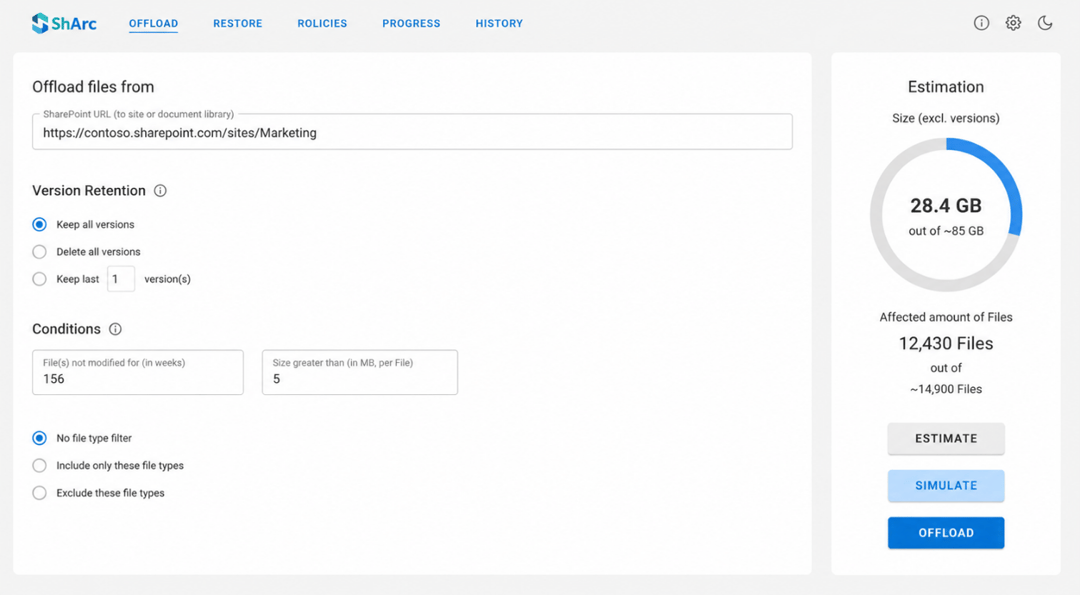
ShArc Estimation helps you understand the expected archive potential before creating final policy batches.
Important: Estimation is currently performed from the Archive page and supports one URL at a time. Estimation is not performed directly from the Policy page and does not estimate multiple URLs as one combined group.
For large tenants, we recommend using Estimation as a planning tool:
- Estimate the largest sites individually.
- Estimate representative sites from each archiving cohort.
- Add the estimation results to your rollout matrix.
- Use the rollout matrix to calculate the expected archive volume per future policy batch.
- Create policy batches based on the calculated total volume.
You usually do not need to estimate every single site individually. For very large tenants, a practical approach is:
| Site group | Recommended approach |
|---|---|
| Largest 20–100 sites | Estimate individually |
| Sites between 100 GB and 1 TB | Estimate individually if they are part of the first rollout waves |
| Sites below 100 GB | Estimate representative examples from each archiving cohort |
| Sensitive sites | Review separately before including them in a policy |
The goal is not to estimate all sites one by one. The goal is to estimate enough representative and high-impact sites to build safe rollout batches.
Step 5: Treat very large sites separately
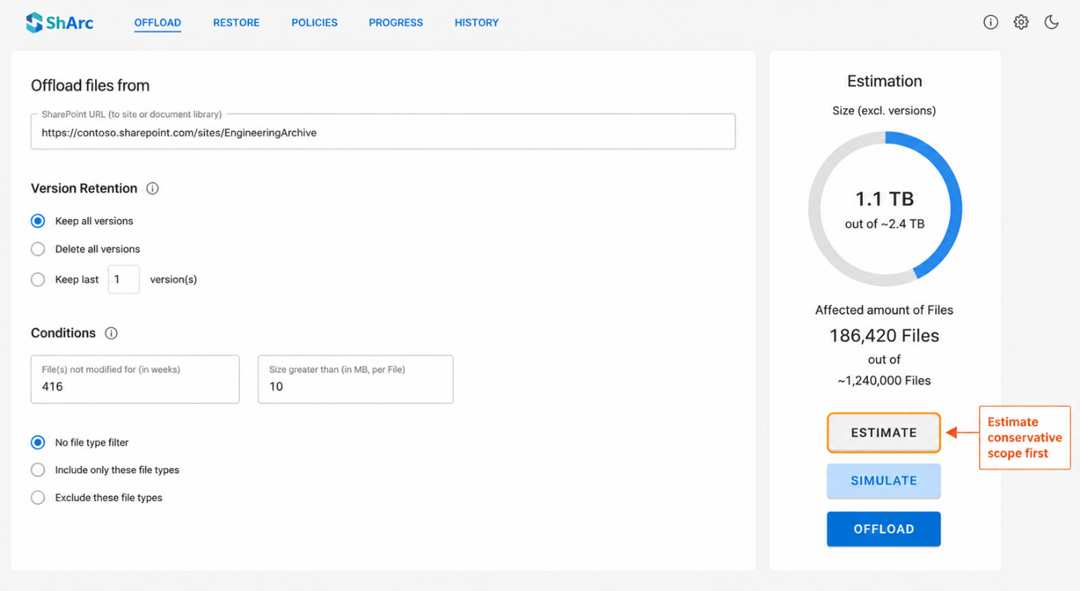
Very large sites can create high savings, but they can also create more SharePoint load and longer runtimes.
For sites significantly larger than 1 TB, we recommend a conservative first test. For example:
- Not modified since: 8 years
- File size: greater than 10 MB
After validating the result, you can gradually expand the scope, for example:
- From 8 years to 5 years
- From 5 years to 3 years
- From files larger than 10 MB to files larger than 5 MB or 1 MB
This approach helps you validate the behavior before applying a broader archiving rule.
Step 6: Build policy batches in your rollout matrix
Once you have estimation results for individual URLs, use your rollout matrix to build policy batches.
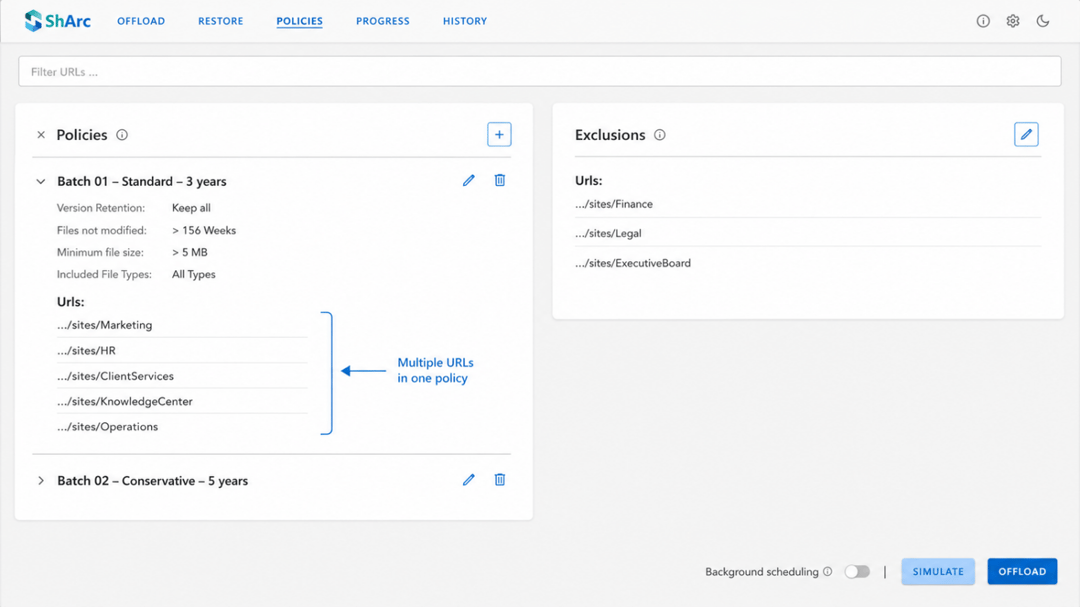
A ShArc policy can contain multiple SharePoint URLs. Therefore, you do not need one policy per site.
However, the expected volume of a policy batch should currently be calculated outside of ShArc, for example in Excel. Add the estimated archive volume per URL and group URLs with the same archiving logic into one policy batch.
A practical starting point is to build batches with approximately 5–10 TB of estimated archive volume. However, the exact size depends on:
- Estimated archive volume per URL
- Number of files
- SharePoint load
- Site size
- Business criticality
- Sensitivity of the content
- Rollout timeline
Policy batches should be built based on operational risk, not only based on the number of sites.
Example:
| Policy batch | Rule | Input | Estimated archive volume |
|---|---|---|---|
| Batch 01 – Standard archive | Not modified since 3 years, file size >5 MB | Sum of individually estimated URLs | 7.5 TB |
| Batch 02 – Conservative archive | Not modified since 5 years, file size >10 MB | Sum of individually estimated URLs | 6.2 TB |
| Batch 03 – Project sites | Not modified since 2 years, file size >1 MB | Based on representative estimations and site inventory | 8.8 TB |
| Batch 04 – Large sites | Individual validation required | Individually estimated large sites | 4.5 TB |
Step 7: Use Simulation selectively
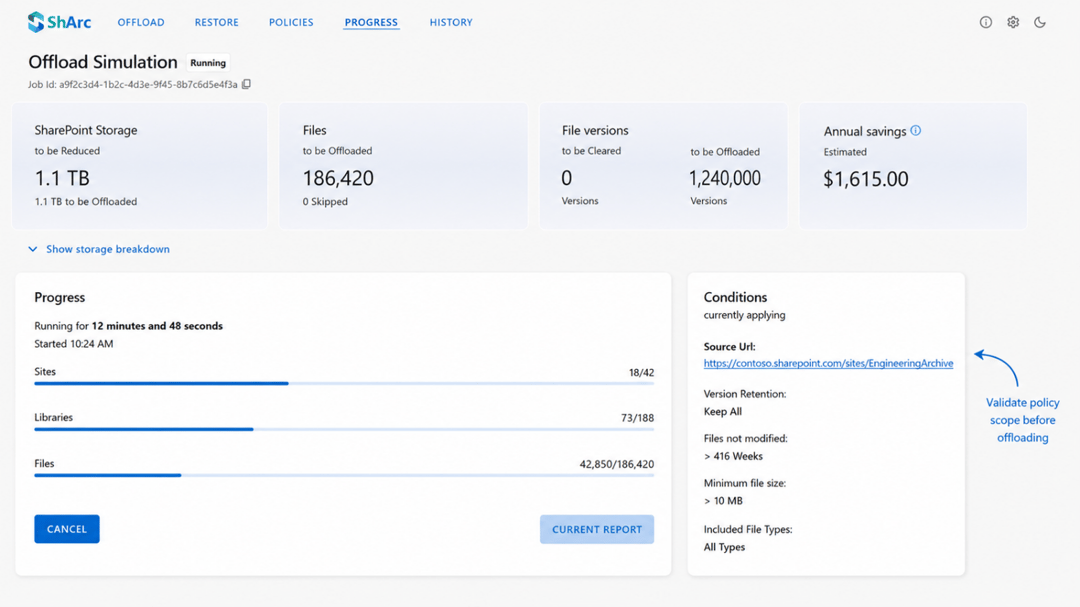
ShArc Simulation provides more detailed results than Estimation, including reporting down to the library level.
However, Simulation can take longer depending on the size of the selected sites, the number of files, and the configured filters.
For large tenants, Simulation should be used selectively rather than for every single site.
We recommend using Simulation for:
- The first rollout batch
- Very large sites
- Sensitive departments
- High-risk policies
- Policy groups where the estimation result needs validation
- Scenarios where library-level reporting is required before archiving
You do not need to simulate every small or low-risk site if the archiving logic has already been validated.
Step 8: Execute the first policy batch
After planning, estimation, and selective simulation, start with the first policy batch.
We recommend beginning with a controlled batch instead of starting with the full tenant.
A good first batch should be:
- Relevant enough to show measurable savings
- Not too large
- Not business-critical
- Based on a validated archiving rule
- Easy to review after completion
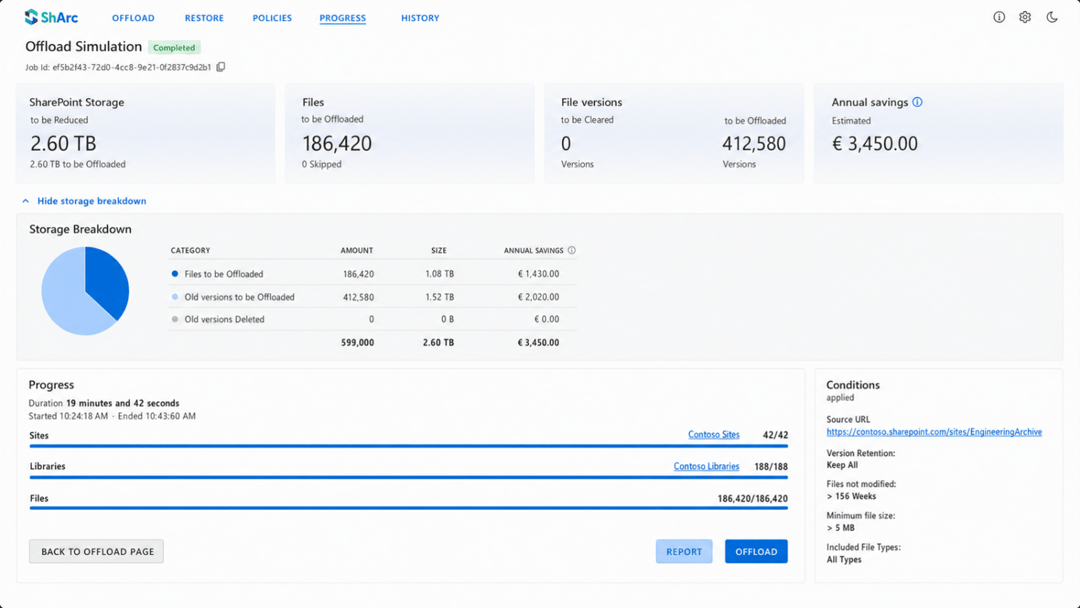
After the first archiving run, validate the outcome before continuing.
Recommended validation points:
- Was the expected archive volume reached?
- Were there unexpected exclusions?
- Did the runtime match expectations?
- Were end users able to access and restore files as expected?
- Did any errors or warnings appear?
- Does the result match the planning assumptions?
Step 9: Continue with the next rollout batch
Once the first batch has been validated, continue with the next batch.
The rollout should continue in waves:
- Execute policy batch.
- Validate results.
- Adjust filters if required.
- Continue with the next batch.
- Repeat until all relevant sites are covered.
This controlled rollout model helps avoid unnecessary risk and allows your team to improve the configuration as you learn more about the tenant.
Recommended policy naming convention
For large tenants, use a clear naming convention for policies.
Recommended format:
Batch number – Archiving logic – Scope
Examples:
- Batch 01 – Standard – 3 years
- Batch 02 – Conservative – 5 years
- Batch 03 – Project Sites – 2 years
- Batch 04 – Large Sites – Manual Review
- Batch 05 – Marketing – 3 years
This makes it easier to understand what each policy does and where it belongs in the rollout.
What to avoid
For large SharePoint tenants, avoid the following approaches:
- Do not create one policy per site.
- Do not start all sites at once.
- Do not rely on Simulation for every single site.
- Do not group sites only by URL structure.
- Do not include sensitive departments without review.
- Do not start with the most aggressive rule on very large sites.
- Do not build policy batches only based on the number of sites.
Instead, use a planning-first approach based on site inventory, individual URL estimations, expected archive volume, risk, and rollout sequence.
Summary
ShArc can support large SharePoint environments with several thousand sites. However, large-scale archiving should be rolled out in a structured way.
For large tenants, we recommend:
- Defining the target SharePoint storage level first.
- Calculating how much data must be archived to remove paid additional storage.
- Keeping a buffer within the included SharePoint storage capacity, for example 10%.
- Factoring in expected monthly SharePoint growth if this information is available.
- Exporting the SharePoint site inventory.
- Grouping sites by archiving logic and risk.
- Using Estimation from the Archive area for selected individual URLs.
- Documenting estimation results in a rollout matrix.
- Creating policy batches by summing individual URL estimation results outside of ShArc.
- Using Simulation selectively for validation.
- Starting with controlled rollout batches.
- Treating very large or sensitive sites separately.
- Scaling gradually after each successful validation.
- Maintaining the storage buffer over time with recurring policies.
The goal is not only to archive data once. The better operating model is to reduce SharePoint usage to a defined target level and then keep enough free included capacity for future growth.
Need help planning your ShArc policies?
If you are working with a large SharePoint tenant and need help creating the right policy structure, we recommend a short technical planning session.
In this session, we can help you:
- Review your exported SharePoint site list
- Identify suitable archiving groups
- Define policy batches
- Decide which sites should be simulated first
- Plan a safe rollout sequence
- Handle very large or sensitive sites separately
Contact us if you would like support with planning your ShArc policy rollout.