
Last updated: September 14, 2026
For many organizations, Microsoft 365 and SharePoint have become the backbone of collaboration. But as document libraries grow, so do storage costs and compliance headaches. Traditional archiving and manual cleanup no longer keep pace with the demands of modern enterprises. What IT leaders need today is automation: rules that ensure files are stored in the right place, at the right time, without breaking compliance or disrupting end users.
This is exactly what ShArc policy management delivers. By combining flexible archiving rules with a hierarchical structure tailored to Microsoft 365, ShArc gives US-based IT admins and CIOs the power to manage storage intelligently while keeping data secure inside their own Azure tenant.
Feature overview: ShArc policy management
ShArc policy management introduces a rule-based automation framework that determines which files should remain in SharePoint and which should be archived to Azure Blob Storage. The goal: reduce costs, optimize performance, and retain full compliance without adding administrative burden.
Key features at a glance
- Hierarchical policy structure: define policies at domain, site, subsite, or library level.
- Flexible criteria: apply rules based on file size, file age, or a combination of both.
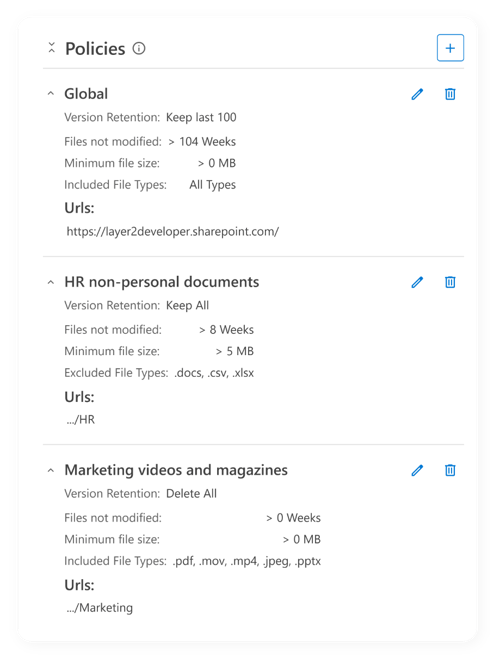
- Smart override system: more specific policies automatically override general ones.
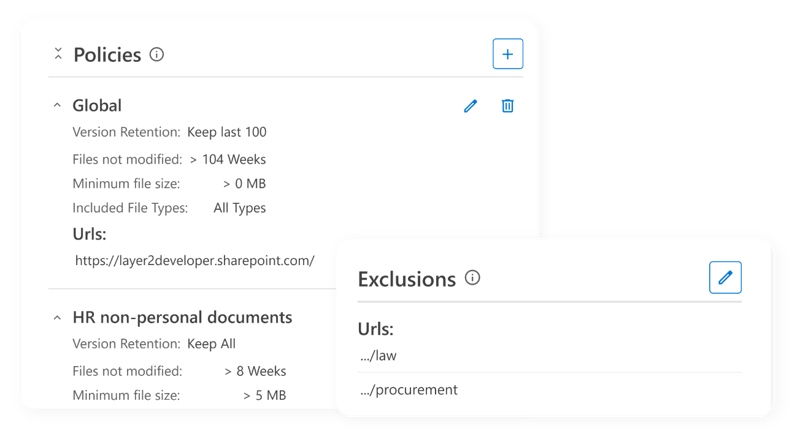
- Exclusion support: keep sensitive departments (like Legal or HR) out of global rules.
- Combined criteria (and logic): target files with precision by applying multiple conditions.
How policy management works
Now we will take a closer look at how policy management works.
Quick Start Policy Examples
Example 1: Basic Size-Based Policy
- Scenario: Archive all files larger than 50MB across your tenant.
- Setup: Domain Level | Size > 50MB
- Result: Any file above 50MB moves seamlessly to Azure Blob Storage.
Example 2: Age-Based Archiving
- Scenario: Archive files older than 6 months in the Marketing Site.
- Setup: Site Level | Age > 24 weeks
- Result: Files untouched for 6 months get archived—freeing space without deleting data.
Example 3: Combined Criteria
- Scenario: Archive files over 25MB and older than 8 weeks.
- Setup: Domain or Site Level | Size > 25MB AND Age > 8 weeks
- Result: Only files meeting both conditions are archived.
Example 4: Hierarchy Override
- Scenario: General policy archives files >100MB, but HR requires a stricter 10MB limit.
- Setup: Domain Policy: >100MB | HR Site Policy: >10MB
- Result: HR rules override global rules—enabling department-specific governance.
Example 5: Exclusion Policy
- Scenario: Company-wide policy archives files older than 12 weeks, except for Legal.
- Setup: Domain Policy: Age > 12 weeks | Exclusion: Legal Site
- Result: Legal files remain untouched, all other departments follow the rule.
How policies work
ShArc mirrors SharePoint’s natural hierarchy:
Domain (Tenant)
Site Collection A
- Library A1
- Library A2
Site Collection B
Override Behavior:
- Library > Subsite > Site > Domain
- More specific always wins.
This layered approach ensures global rules provide structure, while department or library-level policies handle exceptions.
Policy Criteria in Detail
Size Criteria:
- Example: Size > 50MB
- Use Case: Free up costly SharePoint space consumed by large media files.
Age Criteria:
- Example: Age > 12 weeks
- Use Case: Move stale, rarely accessed documents without deleting them.
Combined Criteria (AND Logic)
- Example: Size > 25MB AND Age > 8 weeks
- Use Case: Archive files that are both heavy and inactive.
Exclusions
- Example: Exclude Legal Site from global archiving rules.
- Use Case: Protect sensitive data from automation while ensuring compliance.
WhyShArc policy management is a game-changer
ShArc policy management empowers IT teams to take control of SharePoint storage with automation, intelligence, and precision. Whether you want to cut costs, enforce compliance, or simply reduce clutter, ShArc delivers a flexible framework that adapts to your organization. The result? Data Governance, lower costs, and zero compromise on usability.
Discover all of Sharc's features in our overview: