Last updated: September 14, 2026
Learn how much SharePoint costs per GB/TB and how fast costs can rise.
What storage really costs and how to control it
When organizations move more content into Microsoft 365, one question comes up again and again: What are the real SharePoint costs per GB or TB?
At first glance, SharePoint Online storage looks simple. In reality, costs can grow quietly and unexpectedly especially in large or unmanaged environments. This article breaks down how SharePoint storage pricing works, what drives up costs, and how to keep them under control.
How SharePoint Online storage is calculated
SharePoint Online storage is pooled at the tenant level and shared across:
- SharePoint sites
- Microsoft Teams files
- OneDrive for Business
Base storage included
Microsoft provides:
- 1 TB base storage per tenant
- + 10 GB per licensed user
Example:
If you have 500 licensed users:
- 1 TB base
- 5 TB (500 × 10 GB)
6 TB total included storage
- 5 TB (500 × 10 GB)
SharePoint costs per GB / TB (additional storage)
Once you exceed your included storage, Microsoft charges for additional storage. Typical pricing (may vary by region and contract):
- Per GB per month, billed annually
- Roughly €0.18–€0.23 per GB / month
- That equals €180–€230 per TB / month
- Or €2,000–€2,700 per TB per year
This means just 5 extra TB can cost well over €10,000 per year.
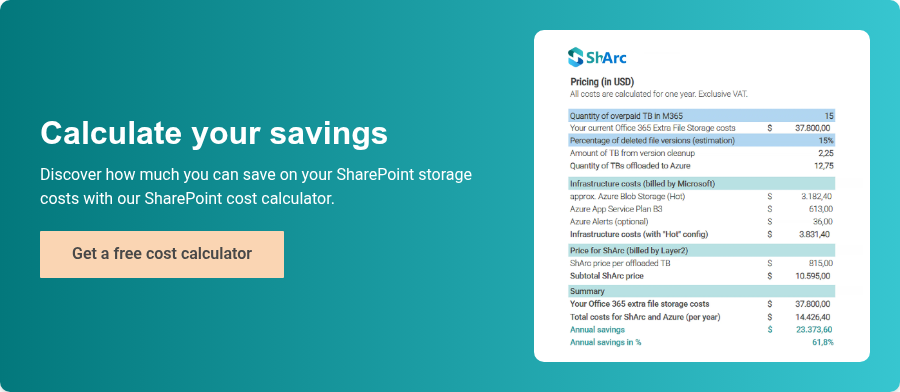
Before you have to purchase additional storage, see what SharePoint extra storage costs and what you can do first.
Why SharePoint storage costs increase so fast
Many organizations are surprised by how quickly SharePoint storage grows. Common reasons include:
1. Document versioning
- Every version consumes storage
- Large files (PowerPoint, Excel, PDFs) multiply storage usage
- It’s common for 70–90% of site size to be version history
2. Lack of cleanup or archiving
- Old project sites never deleted
- Legacy team sites still storing data
- No lifecycle management policies
3. Microsoft Teams sprawl
- Every Team creates a SharePoint site
- Files are stored long after teams become inactive
4. Large media and data files
- Videos, design files, exports, backups
- Often uploaded without storage awareness
What does 1 TB of SharePoint storage really mean?
To put it into perspective, 1 TB can be:
- ~200,000 Office documents with minimal versions
- or ~20,000 files with heavy versioning
- or just a few thousand large media files
1 TB can disappear very quickly.
SharePoint cost visibility: a common gap
One of the biggest challenges is visibility:
- The M365 Admin Center shows total usage
- It rarely explains which sites consume the most
- Version storage is often invisible to site owners
As a result, organizations pay for storage without knowing:
- Which sites drive costs
- Whether the data is still relevant
- Who owns the content
How to reduce SharePoint costs per GB or TB
1. Identify large sites and libraries
Focus on:
- Largest SharePoint sites
- Libraries with high file counts
- Old or inactive content
2. Review and limit versioning
- Reduce number of stored versions
- Clean up excessive version history
- Apply different rules for large file types
This can free up terabytes of storage.
3. Archive instead of paying for active storage
Not all data needs to stay in SharePoint Online:
- Archive old projects
- Move inactive content to cheaper storage
- Keep SharePoint for active collaboration
4. Implement storage governance
Best practices include:
- Regular storage reviews
- Ownership and accountability per site
- Automated cleanup or retention policies
- Clear rules for Teams and site creation
Is paying for extra SharePoint storage always bad?
Not necessarily. Paying for additional TB makes sense when:
- Data is active and business-critical
- Compliance requires online availability
- Collaboration depends on fast access
But paying for unused, outdated, or redundant data is where costs become unnecessary. If you want to know how many of your files are outdated, the ShArc feature simulation can help you.
Final thoughts: SharePoint costs per GB or TB add up quickly
SharePoint Online storage pricing is simple on paper but expensive at scale. Understanding your SharePoint storage costs per GB or TB is not just a licensing topic, it’s a governance and data management issue. Organizations that actively analyze, clean up, and manage SharePoint storage can save thousands per year without impacting productivity. Try the Layer2 Cost Calculator now and see how much money you can save on SharePoint storage cost.